
Last updated September 18, 2026
An eye test chart online is a digital tool used for preliminary vision screening to measure clarity at a specific distance. While helpful for identifying general blurring, it cannot diagnose ocular diseases or determine a precise prescription. Only a comprehensive exam by a licensed optometrist can ensure your total eye health.
Table of contents
- Key takeaways
- Understanding Visual Acuity and the Snellen Chart
- How to Set Up Your Digital Vision Screening
- Vision Screening vs Professional Eye Exams
- Limits and Risks of Relying on Online Eye Charts
- Transitioning from Screening to Boutique Care
- Frequently asked questions
Key takeaways
- Screening vs. Diagnosis. Digital eye charts are screening tools for visual acuity, not diagnostic medical devices.
- Proper Calibration. Correct screen calibration, such as using a credit card for scale, is vital for accuracy.
- Pediatric Norms. A result of 20/40 in a 3- to 4-year-old child is typically considered a normal developmental finding.
- Health Limitations. Online tests fail to detect internal eye health issues like glaucoma or retinal thinning.
- Initial Step. Home screenings should serve as a precursor to professional frame styling and medical exams.
Understanding Visual Acuity and the Snellen Chart
Visual acuity refers to the sharpness of your vision at a distance of 20 feet, the gold standard for measuring how well you see the world around you. The standard Snellen Chart uses rows of letters that decrease in size to measure this clarity. The top "E" represents what a person with normal vision could see from 200 feet away. When you use these tools at home, you are essentially checking if you can resolve fine details or if a refractive error is causing functional blurring.
Home screenings help you identify if you are meeting the 20/20 standard or if blurring is present. They act as an early warning system for your ocular health. For children who do not know their letters yet, the Safe Eyes America Pediatric Vision Tools uses recognizable shapes instead of the full alphabet to ensure the child understands the task. You can easily screen your vision for free to get a baseline understanding of your current sight. This provides a helpful starting point before you visit a clinic. By understanding your Snellen chart interpretation, you can better communicate your concerns to a professional during your next visit.
How to Set Up Your Digital Vision Screening
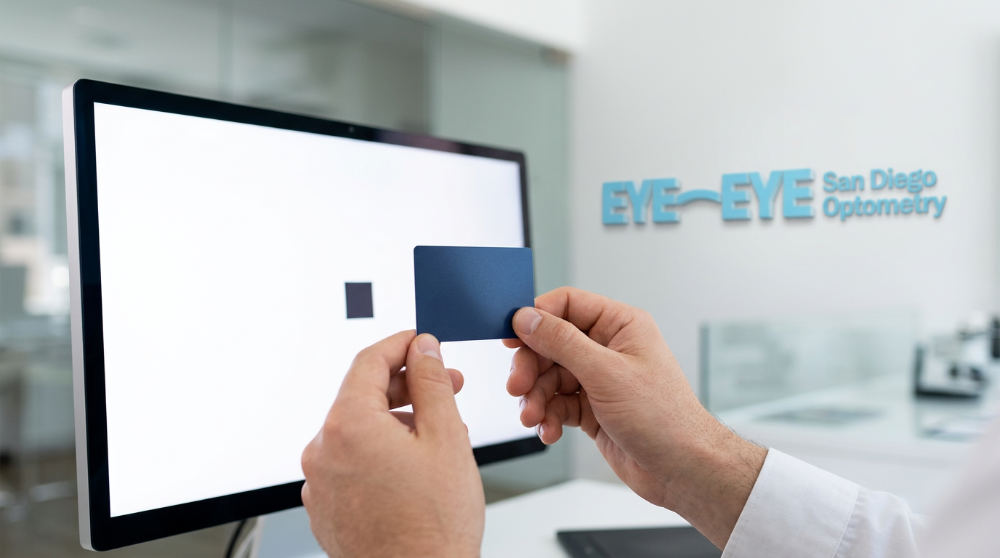
To ensure accuracy, calibrate your screen by measuring a physical object, like a credit card, against the display to verify the scale. Because screen resolutions vary wildly between a laptop and a large desktop monitor, the software must know exactly how large to render the letters to maintain the correct angular size. Ensuring the software matches physical dimensions is the only way to get a reliable result during a visual acuity test online.
Calibration Tip: Before starting a digital test, hold a standard credit card to the screen. If the digital box matches the card, your scaling is correct for an accurate visual acuity test.
- Lighting and Placement. Place your device at eye level on a windowless wall in a well-lit room to avoid glare. According to Vision Source, for a home test, the chart should be taped to a windowless wall in a well-lit room at eye level. Glare on a glossy screen can wash out the black letters, leading to a false sense of poor vision.
- Physical Distance. Measure the exact distance required by the specific online tool (usually 10 or 20 feet) using a ruler or tape measure. Even being off by a few inches can skew your results significantly.
- Isolate Each Eye. Test each eye individually by covering one eye at a time without applying pressure to the eyelid. Pressing on the globe of the eye can cause temporary warping of the cornea, making the subsequent test inaccurate.
- Brightness Control. Maintain consistent screen brightness to mimic the high-contrast environment of a professional Snellen Chart interpretation. A dim screen reduces the contrast ratio, making it harder to distinguish edges.
Vision Screening vs Professional Eye Exams
A screening only measures how well you see; a professional exam evaluates the biological health of the eye. While you might be able to read the smallest line on a screen, that result tells you nothing about the pressure inside your eye or the integrity of your retina. Clinics that offer comprehensive eye exams provide professional assessments that pick up where online charts leave off.
Online charts cannot detect silent conditions like glaucoma or early-stage macular degeneration. These often present no symptoms until vision loss is permanent. If you are monitoring your sight at home, you might use an Amsler Grid to check for wavy lines or dark spots, which may indicate central vision distortions. This tool is a grid of straight lines that should appear perfectly parallel. If they look distorted, the macula may be under stress. This is a critical component of a comprehensive vision screening at home.
| Feature | Online Screening | Professional Exam at EYE EYE |
|---|---|---|
| Visual Acuity | Measures basic clarity | Precise refractive measurement |
| Internal Health | Not available | Retinal imaging & pressure checks |
| Prescription | Estimated/None | Legal RX for corrective lenses |
| Frame Styling | None | Personalized designer selection |
| Eye Strain | May increase strain | Eye Spa recovery treatments |
Limits and Risks of Relying on Online Eye Charts
You cannot use an online eye test chart to generate a legal prescription for independent designer frames. Prescription eyewear requires a level of precision that digital tools simply cannot provide. They lack the ability to measure astigmatism or the physical distance between your pupils. A home eye exam for kids can provide a preliminary check, but it cannot replace the comprehensive exams conducted in Bankers Hill.
Watch Out: Digital eye strain can cause temporary blurring that makes your online test results look worse than they actually are.
Digital eye strain test results at home often ignore the physiological fatigue caused by blue light and flicker. If you have been staring at a screen all day before taking a home test, your eyes may be stuck in a "accommodative spasm." This leads to results that suggest you are more nearsighted than you truly are. Relying solely on home tests can lead to a false sense of security while underlying health issues progress silently.
Inaccurate lighting or poor screen resolution can produce "false negatives." The backlight increases contrast beyond what you would experience in the real world, making your vision seem better than it is. Furthermore, home testing is never a substitute for pediatric developmental screenings performed by a specialist. The American Academy of Ophthalmology test guidelines note that children require specific clinical checks to ensure their eyes are working together correctly. A letter chart cannot measure that.
Transitioning from Screening to Boutique Care
If your home screening suggests blurring, the next step is a professional evaluation in a personalized setting. A screening is a great way to flag a problem, but it doesn’t provide the solution. At EYE EYE, we pair your clinical results with dedicated frame styling to find eyewear that complements your personality and facial structure. Once you can see clearly, you should look your best doing it.
We offer professional eye care services to help patients recover from the digital eye strain identified during frequent screen use. An in-person visit to our Bankers Hill location allows you to explore a curated collection of independent designer frames. These are handpicked from global artisans. This is a significant step up from the mass-market options found in corporate chains or online warehouses. By choosing a local, independent practice, you ensure that your eye care is as unique as your vision.
To move beyond the basic screening and ensure you SEE GOOD All the Time, please reach out to our team. Call us at 619-815-5864 or visit our location at 2765 Fifth Ave Suite 15, San Diego, CA 92103. You can Appointments online to schedule your visit.
Frequently asked questions
Can an eye test chart online replace a professional exam?
No, it only screens for basic visual acuity and cannot check for eye disease. Professional exams involve physical inspections of the internal eye structures, such as the retina and optic nerve. Prescriptions for corrective lenses require a licensed optometrist’s verification to ensure they are safe and effective for your specific refractive needs.
How far should you stand from an online eye chart?
Most digital charts require standing 10 feet away, though some are calibrated for 20 feet. Check the specific software instructions as distances vary based on screen scaling and resolution. Use a physical tape measure to ensure the distance is precise. Guessing the distance can lead to highly inaccurate results.
Why does my vision seem better on a screen than on a printed chart?
Backlit screens provide higher contrast, which can artificially enhance the appearance of letters and make them easier to read than on paper. Screen glare or improper scaling can also distort the true size of the optotypes. A printable Snellen chart often provides a more realistic representation of everyday distance vision in natural lighting conditions.
Can I use an online eye chart to get a new prescription?
No, online screenings are not valid for purchasing prescription eyewear. A comprehensive exam is needed to determine the exact refractive error and pupillary distance of your eyes. Once you have a valid prescription from a licensed professional, you can shop for independent designer frames with confidence.
What is the Amsler Grid?
It is a grid of horizontal and vertical lines used to monitor the central visual field for changes. It helps identify distortions, wavy lines, or blind spots that a standard letter chart might miss entirely. It is particularly useful for those monitoring their vision for signs of macular health changes or other retinal concerns.